![Bionic-Logo-184x60-white.png]](https://help.bionic-ads.com/hs-fs/hubfs/Bionic-Logo-184x60-white.png?height=40&name=Bionic-Logo-184x60-white.png)
Trained users get the most value from Bionic. To help you monitor your team’s learning progress, you can view each user’s Bionic Academy certification status directly in your organization’s Administration settings.
This feature helps you see which users have completed their certifications and who is still in progress, all within your Bionic account.
In this article we'll cover:
Access Training Certification Progress
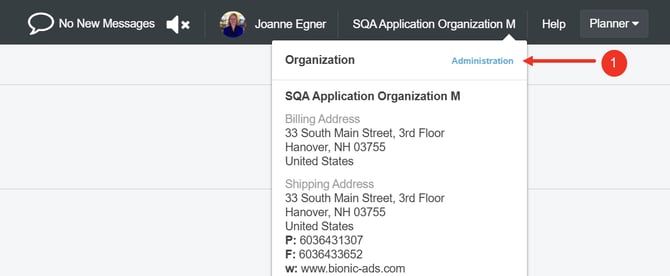
You can access certification tracking from your Administration area in Bionic. This view is available to organization administrators and shows all users and their certification progress in one place.
Here's how:
- Go to your Administration area
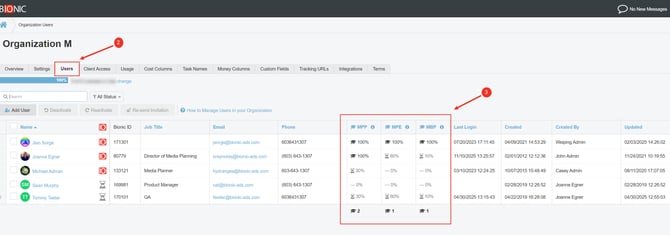
- Click on the Users tab
- View the Bionic Academy Training Progress columns
-
Each column represents certification types (for example, Media Planning Professional, Media Planning Expert, Media Buying Professional). NOTE: Hover over the header to see the certification name.
-
Progress bars indicate completion percentage.
- At the bottom of the table, you’ll see a summary of completed certifications.
-