![Bionic-Logo-184x60-white.png]](https://help.bionic-ads.com/hs-fs/hubfs/Bionic-Logo-184x60-white.png?height=40&name=Bionic-Logo-184x60-white.png)
In some cases, line items in a Media Plan may not appear as expected. This can include missing rows, items appearing out of order, or sections of the plan not displaying correctly.
This does not impact underlying data or calculations, only how the Media Plan is currently displayed.
These situations are typically related to how the workspace is loaded and can often be resolved by refreshing or re-sorting the Media Plan.
Table of Contents
Refresh the Media Plan
If line items are not displaying as expected, the first step is to refresh the Media Plan.
Learn more here on how to Refresh the Media Plan.
Sort the Media Plan
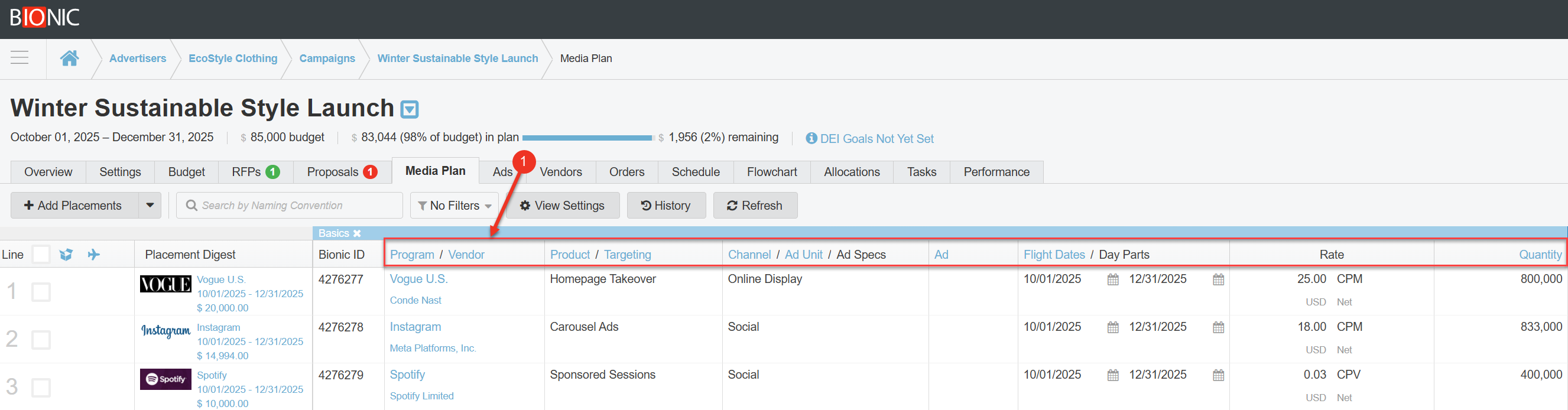
If refreshing does not resolve the issue, sorting the Media Plan can help correct how items are displayed.
To sort the Media Plan:
-
Locate and click a column header (such as Vendor, Start Date, or Cost).
Contact Customer Support
If the Media Plan still does not display correctly after refreshing and sorting, please contact Bionic Customer Support.
When reaching out, it is helpful to include:
-
The Campaign Name
-
The Media Plan Name
-
A brief description of what is not displaying correctly
Providing this information will help the support team review and assist with resolving the issue.